Earlier this week I wrote how we had to write basically the same reply every time someone didn’t read a page on our website.
Today I’ve turned that into a ChatGPT auto-reply. A step up from a template reply or a regular out-of-office-like auto reply.
The website contact form is a Typeform form, which Zapier can be triggered by. I take that form data and also take all of the text off the page they aren’t reading, and using Zapier ask ChatGPT to write a reply.
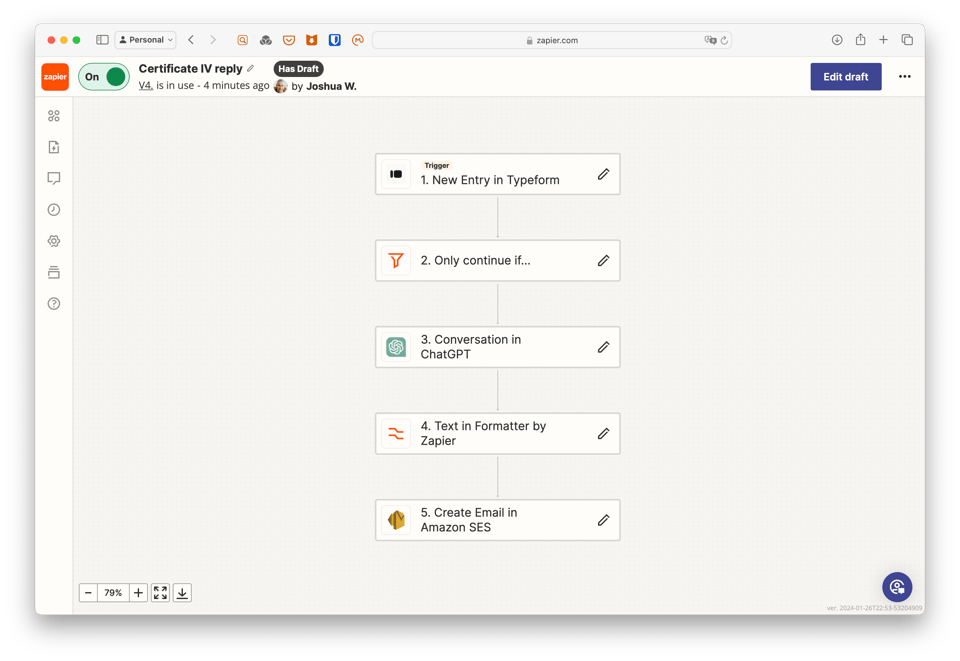
- Zapier zap triggered by Typeform form
- Only run this zap if the topic of the contact form is the Certificate IV in Celebrancy
- Write a message to ChatGPT, asking it to reply in Markdown
- Format that Markdown content, mixed with the original email reply, as HTML content.
- Send it to Amazon AWS’s Simple Email Service to be emailed to the inquirer.
This is the instructions given to ChatGPT before the prompt:
You are writing emails on behalf the CEO, an Australian commonwealth marriage celebrant from Melbourne. Only write in UK English, and give your reply in Markdown. Provide a link to {url}. for more information on the course and for enrolment dates. {Followed by a direct copy and paste of the entire webpage contents, formatted in Markdown as ChatGPT prefers}
This is the prompt:
Act as the CEO of the Celebrant Institute RTO, a training organisation in Australia that trains new Commonwealth Marriage Celebrants according to the Commonwealth marriage laws, the Marriage Act of 1961. Reply to this email: {Contents of the enquiry via Typeform}.
This is what I mean when I say we need to work smarter. Get the forklifts doing the heavy lifting so you can do the important work.
Follow-up: Jeseph, on Threads, felt like a non-zero number of people would receive a nonsense email.
Post by @hellojoshwithersView on Threads